
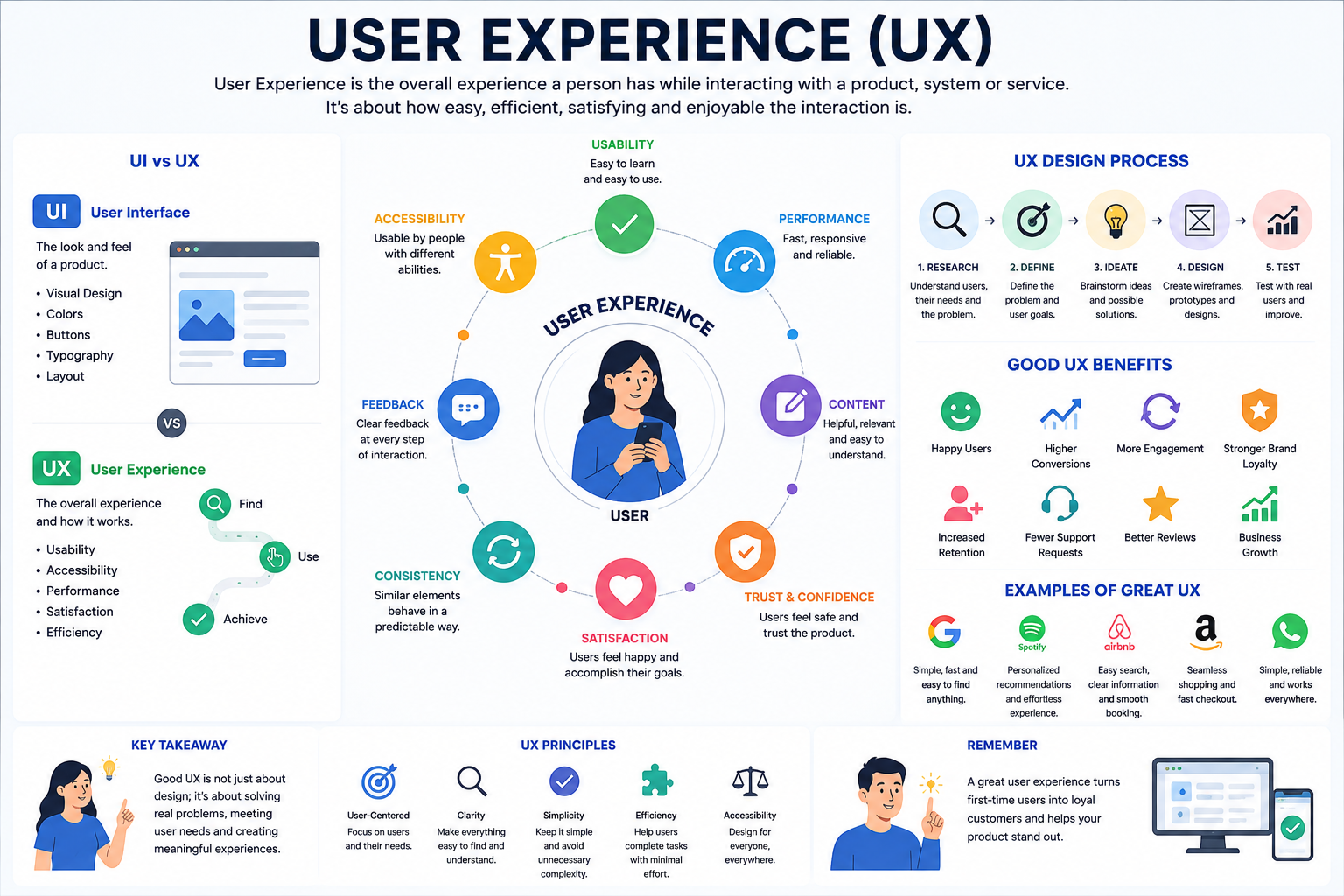
User Experience
# Index
# Description
# Understanding User Experience
# Why Is User Experience Important?
# Elements of User Experience
# Characteristics of Good UX
# Examples of Good User Experience
# Common UX Mistakes
# User Experience Across Devices
# UX in Modern Software Development
# Description
User Experience (UX) refers to the overall experience a person has while interacting with a product, application, website, or service. It focuses on how easy, efficient, accessible, and satisfying the interaction feels to users. While User Interface (UI) deals with visual elements and controls, User Experience encompasses the entire journey users take to accomplish their goals. Good UX helps users complete tasks smoothly and leaves them with a positive impression of the product.
# Understanding User Experience
Imagine two online shopping websites.
Both have attractive colors and modern designs.
However:
- One makes it easy to find products and complete purchases.
- The other has confusing navigation and a complicated checkout process.
Although both may have similar user interfaces, the first provides a better user experience.
UX focuses on how users feel and how effectively they can accomplish tasks.
# Why Is User Experience Important?
A good user experience helps:
- Improve customer satisfaction
- Reduce frustration
- Increase productivity
- Increase conversions
- Build trust
- Improve accessibility
- Encourage repeat usage
Poor experiences often cause users to abandon applications, even if they look visually appealing.
# Elements of User Experience
Usability
Users should be able to complete tasks easily.
Example: A search bar should provide relevant results quickly.
Accessibility
Applications should support users with different abilities.
Examples:
- Keyboard navigation
- Screen reader compatibility
- High contrast modes
Performance
Slow applications negatively affect user experience.
Users generally expect pages to load quickly and respond immediately.
Consistency
Buttons, menus, and interactions should behave similarly throughout the application.
Consistency reduces confusion.
Feedback
Applications should communicate what is happening.
Examples:
- Loading indicators
- Success messages
- Error messages
Users should never feel uncertain about the system's state.
# Characteristics of Good UX
Good user experiences are:
Simple
Users should not need extensive instructions.
Intuitive
Actions should feel natural.
Efficient
Tasks should require minimal effort.
Accessible
Applications should work for everyone.
Reliable
Users should trust the system.
Responsive
Applications should work well across devices and screen sizes.
# Examples of Good User Experience
E-Commerce Websites
Good UX includes:
- Easy navigation
- Product filters
- Fast checkout
- Clear pricing
Banking Applications
Good UX includes:
- Simple transfers
- Secure authentication
- Transaction history
- Quick access to balances
Streaming Platforms
Good UX includes:
- Personalized recommendations
- Continue watching features
- Fast playback controls
Search Engines
Good UX includes:
- Fast results
- Relevant suggestions
- Minimal distractions
# Common UX Mistakes
Complex Navigation
Users should not struggle to find information.
Slow Performance
Long loading times frustrate users.
Poor Mobile Experience
Applications should adapt to different devices.
Excessive Popups
Interruptions negatively affect usability.
Inconsistent Design
Different layouts and behaviors confuse users.
Lack of Feedback
Users should know whether actions succeed or fail.
# User Experience Across Devices
Modern UX extends beyond websites.
Good experiences are needed for:
- Smartphones
- Tablets
- Laptops
- Smartwatches
- Smart TVs
- Automotive systems
- Voice assistants
- AR and VR devices
Each device introduces unique challenges and opportunities.
# UX Design Principles
Many products follow these principles:
Keep Things Simple
Avoid unnecessary complexity.
Prioritize User Goals
Design around what users want to achieve.
Provide Clear Feedback
Inform users about system status.
Maintain Consistency
Similar actions should behave similarly.
Design for Accessibility
Applications should accommodate diverse users.
Optimize Performance
Fast experiences improve satisfaction.
# UX in Modern Software Development
User experience is no longer limited to designers.
Frontend developers, backend engineers, product managers, and accessibility specialists all contribute to creating successful experiences.
Modern applications prioritize:
- Mobile-first design
- Responsive layouts
- Accessibility
- Performance
- Personalization
- Cross-device compatibility
Article Metadata:
Published Date: 2026-06-21
Updated Date: 2026-06-21
About the Author: Team absequ is a group of engineers and researchers working on real-world systems, software development, and technology solutions.