
Types of User Interfaces
# Index
# Description
# Why Are There Different Types of User Interfaces?
# Graphical User Interface (GUI)
# Command Line Interface (CLI)
# Touch User Interface
# Voice User Interface (VUI)
# Gesture-Based Interfaces
# Pen and Stylus Interfaces
# Natural Language Interfaces
# Augmented Reality Interfaces
# Adaptive Interfaces
# Comparing User Interfaces
# Description
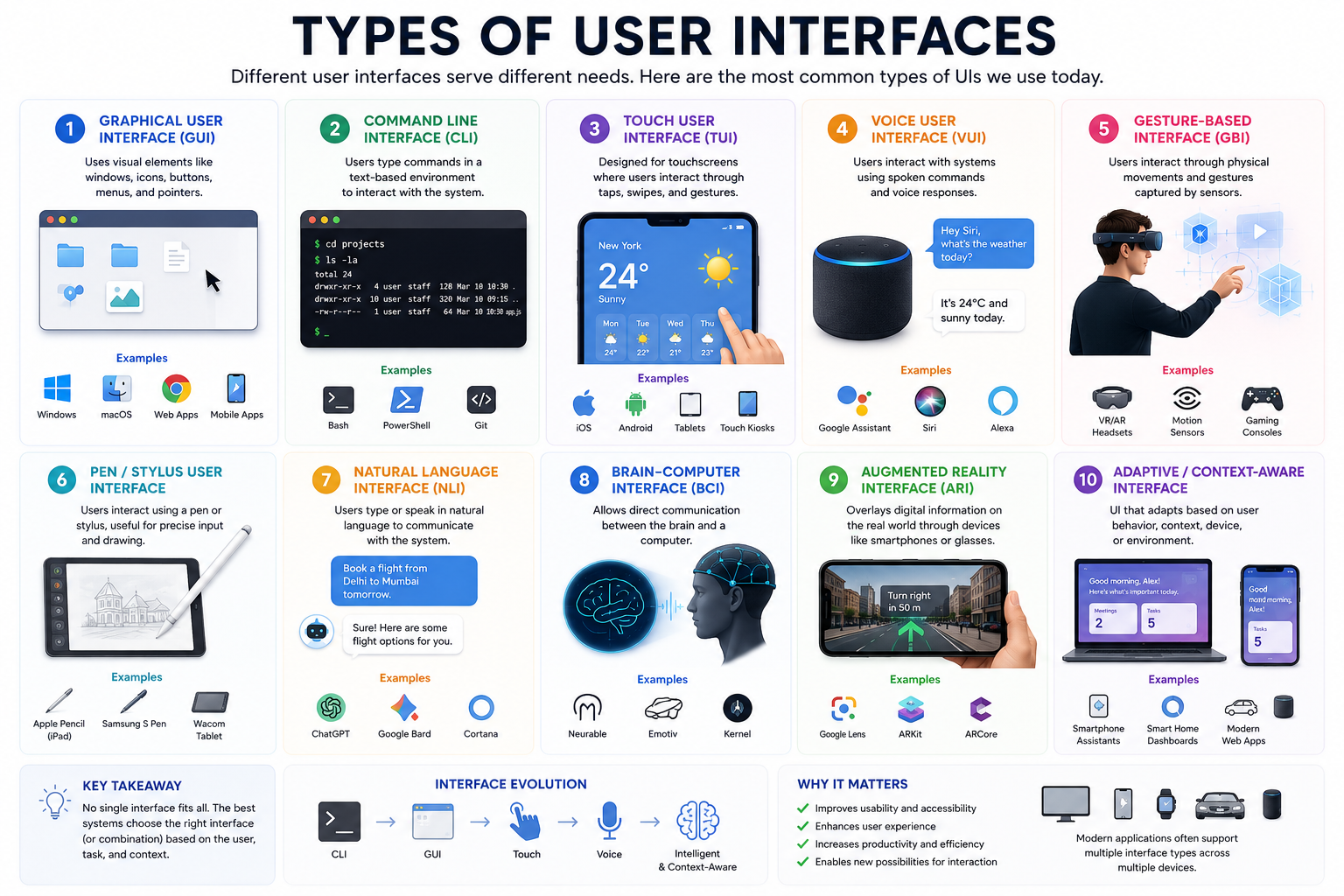
A User Interface (UI) is the medium through which users interact with software, devices, and digital systems. Over time, user interfaces have evolved beyond traditional screens and keyboards to include touch, voice, gestures, and even augmented reality. Different types of user interfaces are designed to suit different devices, tasks, and user needs. Understanding these interfaces helps developers and designers create intuitive and effective user experiences.
# Why Are There Different Types of User Interfaces?
Not every device is used in the same way.
For example:
- A laptop uses a keyboard and mouse.
- A smartphone relies on touch interactions.
- A smartwatch is designed for quick, glanceable information.
- Smart speakers use voice commands.
- Virtual reality systems use gestures and motion.
Different environments and devices require different methods of interaction.
# Graphical User Interface (GUI)
The Graphical User Interface (GUI) is the most common type of interface used today.
Users interact with:
- Windows
- Icons
- Menus
- Buttons
- Scrollbars
Examples:
- Websites
- Desktop applications
- Mobile applications
- Operating systems
Popular operating systems such as Windows, macOS, Android, and iOS all use graphical interfaces.
Advantages:
- Easy to learn
- Visual and intuitive
- Suitable for most users
Limitations:
- Consumes more system resources
- May be slower than command-line operations for advanced tasks
# Command Line Interface (CLI)
A Command Line Interface allows users to interact with a system by typing commands.
Example:
- cd projects
- git status
- npm install
CLIs are commonly used by:
- Developers
- System administrators
- DevOps engineers
Examples include:
- Bash
- Powershell
- Terminal
Advantages:
- Fast and powerful
- Excellent for automation
- Consumes fewer resources
Limitations:
- Steeper learning curve
- Requires memorizing commands
# Touch User Interface
Touch interfaces allow users to interact directly with the screen using gestures.
Common gestures include:
- Tap
- Swipe
- Pinch
- Drag
Examples:
- Smartphones
- Tablets
- Self-service kiosks
- ATM machines
Advantages:
- Natural interactions
- No mouse or keyboard required
- Mobile-friendly
Limitations:
- Limited precision
- Fingerprints and screen smudges
- Smaller screens can restrict usability
# Voice User Interface (VUI)
Voice User Interfaces enable users to communicate through spoken commands.
Examples include:
- Smart speakers
- Voice assistants
- Automotive systems
Users can ask questions or perform tasks using natural language.
Advantages:
- Hands-free interaction
- Accessibility benefits
- Convenient while driving or multitasking
Limitations:
- Requires speech recognition accuracy
- Privacy concerns
- Background noise can interfere with commands
# Gesture-Based Interfaces
Gesture interfaces interpret physical movements and hand gestures
Examples:
- Virtual Reality (VR)
- Motion-controlled gaming systems
- AR headsets
Users interact through:
- Hand movements
- Controllers
- Body motion
Advantages:
- Immersive experiences
- Natural interactions
Limitations:
- Requires specialized hardware
- Learning curve for users
# Pen and Stylus Interfaces
These interfaces use digital pens for precise input.
Examples:
- Drawing tablets
- Tablets with stylus support
- Graphic design applications
Common uses include:
- Illustration
- Note-taking
- Digital signatures
Advantages:
- High precision
- Ideal for creative work
Limitations:
- Additional hardware required
# Natural Language Interfaces
Natural Language Interfaces allow users to communicate using ordinary human language.
Examples:
- AI chatbots
- Search assistants
- Customer support systems
Instead of memorizing commands, users simply ask questions.
Advantages:
- Easy to use
- Conversational interaction
Limitations:
- Ambiguity in language
- Depends heavily on language models and processing
# Augmented Reality Interfaces
Augmented Reality (AR) overlays digital content onto the physical world.
Examples:
- Smart glasses
- Navigation systems
- Mobile AR applications
Applications include:
- Education
- Healthcare
- Gaming
- Retail
Advantages:
- Rich visual experiences
- Real-world context
Limitations:
- Hardware limitations
- Battery consumption
# Adaptive Interfaces
Adaptive interfaces adjust automatically based on:
- User behavior
- Device type
- Context
- Preferences
Examples:
- Dark mode
- Responsive websites
- Personalized dashboards
Modern applications increasingly use adaptive interfaces to improve user experiences.
# Comparing User Interfaces
| Interface Type | Primary Input | Examples |
|---|---|---|
| GUI | Mouse, Keyboard, Touch | Websites, Desktop Apps |
| CLI | Keyboard | Terminal, Bash |
| Touch UI | Finger Gestures | Smartphones, Tablets |
| Voice UI | Speech | Smart Speakers |
| Gesture UI | Motion | VR Headsets |
| Stylus UI | Pen Input | Drawing Tablets |
| Natural Language UI | Conversation | AI Assistants |
| AR Interface | Camera and Sensors | Smart Glasses |
Article Metadata:
Published Date: 2026-06-23
Updated Date: 2026-06-23
About the Author: Team absequ is a group of engineers and researchers working on real-world systems, software development, and technology solutions.